No items found.
AI
Jan 30, 2024

Learn how Agentforce, MuleSoft, and Salesforce Health Cloud automate patient follow-ups and deliver ROI within 6 months.
Healthcare providers lose revenue every day because clinical staff cannot keep up with patient outreach. Medical assistants spend hours dialling numbers and leaving voicemails instead of providing direct care. Readmission rates climb. Scheduling gaps widen. Manual processes fail at scale.
Agentforce changes this. Autonomous AI agents take over routine communication tasks, connect directly to electronic health records through MuleSoft integration, and trigger post-discharge check-ins, preventive screenings, and medication reminders without human intervention.
This guide covers the financial case for automating patient workflows, the Salesforce and MuleSoft architecture required to do it securely, and the implementation steps that deliver measurable ROI within six months.
Missed appointments cost the United States healthcare system an estimated $150 billion annually. Patients forget follow-ups. Clinics fail to send timely reminders. The resulting schedule gaps represent pure revenue loss.
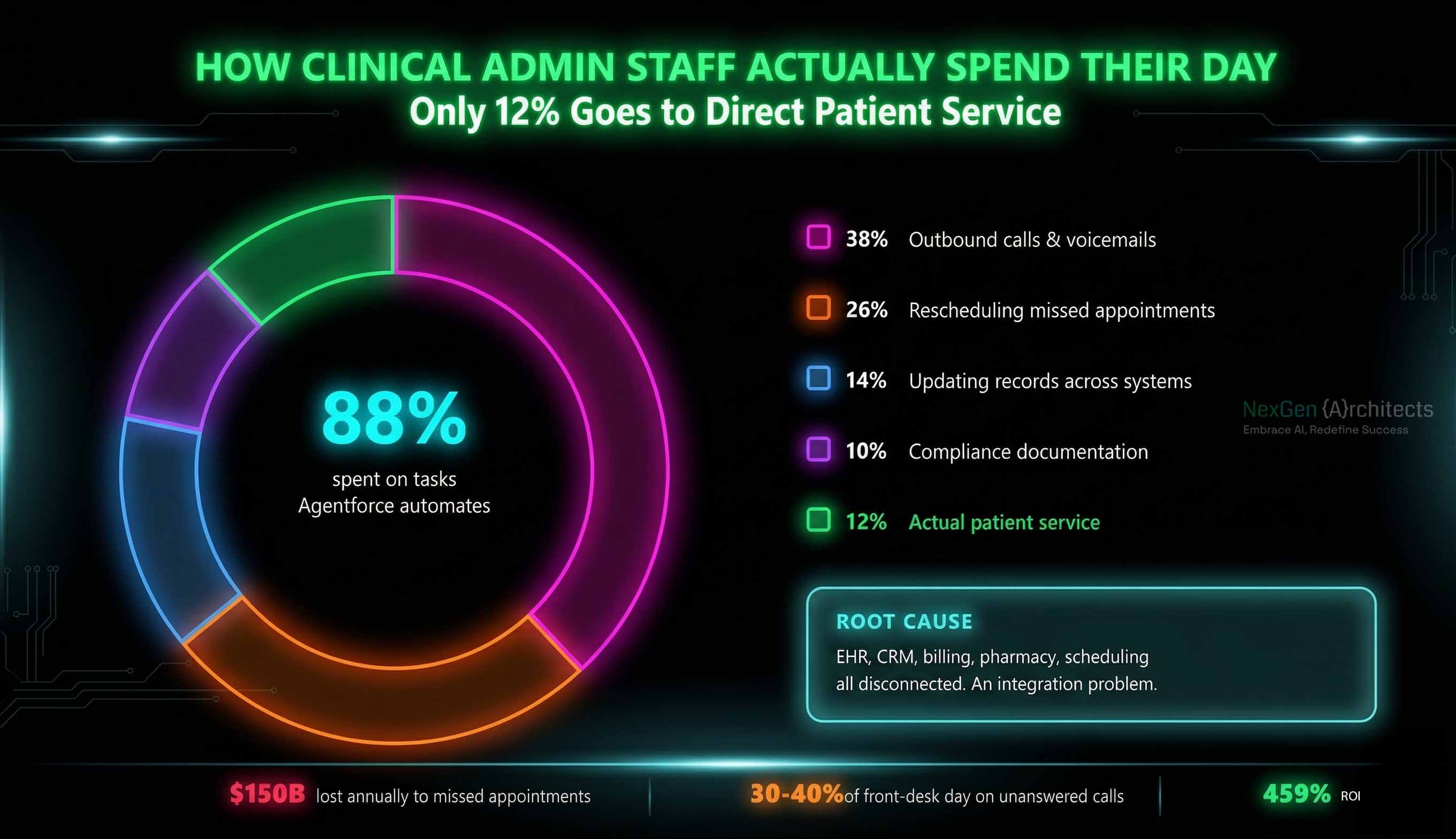
The problem compounds across every department:
Manual outreach cannot solve this at scale. Most healthcare organisations operate with disconnected systems the EHR holds clinical data, the CRM holds contact preferences, billing holds insurance details, and none of them talk to each other in real time. That fragmentation is an integration problem, and it guarantees scheduling gaps until it's addressed.
Agentforce is Salesforce's autonomous AI agent platform. In healthcare, it deploys AI agents that execute administrative tasks independently scheduling, reminding, following up, and escalating without requiring a human to initiate or monitor each interaction.
An Agentforce agent connected to Salesforce Health Cloud can process a list of 500 post-discharge patients in minutes. The system sends personalised messages through the patient's preferred channel (SMS, email, or portal), interprets their replies, and updates the Health Cloud timeline automatically.
Agentforce doesn't work in isolation. It depends on three connected layers: Salesforce Health Cloud as the patient record system, Salesforce Data Cloud as the unified data layer, and MuleSoft as the integration backbone connecting your EHR, billing, pharmacy, and scheduling systems into one governed data flow. Without that integration foundation, the agent has no context to act on.
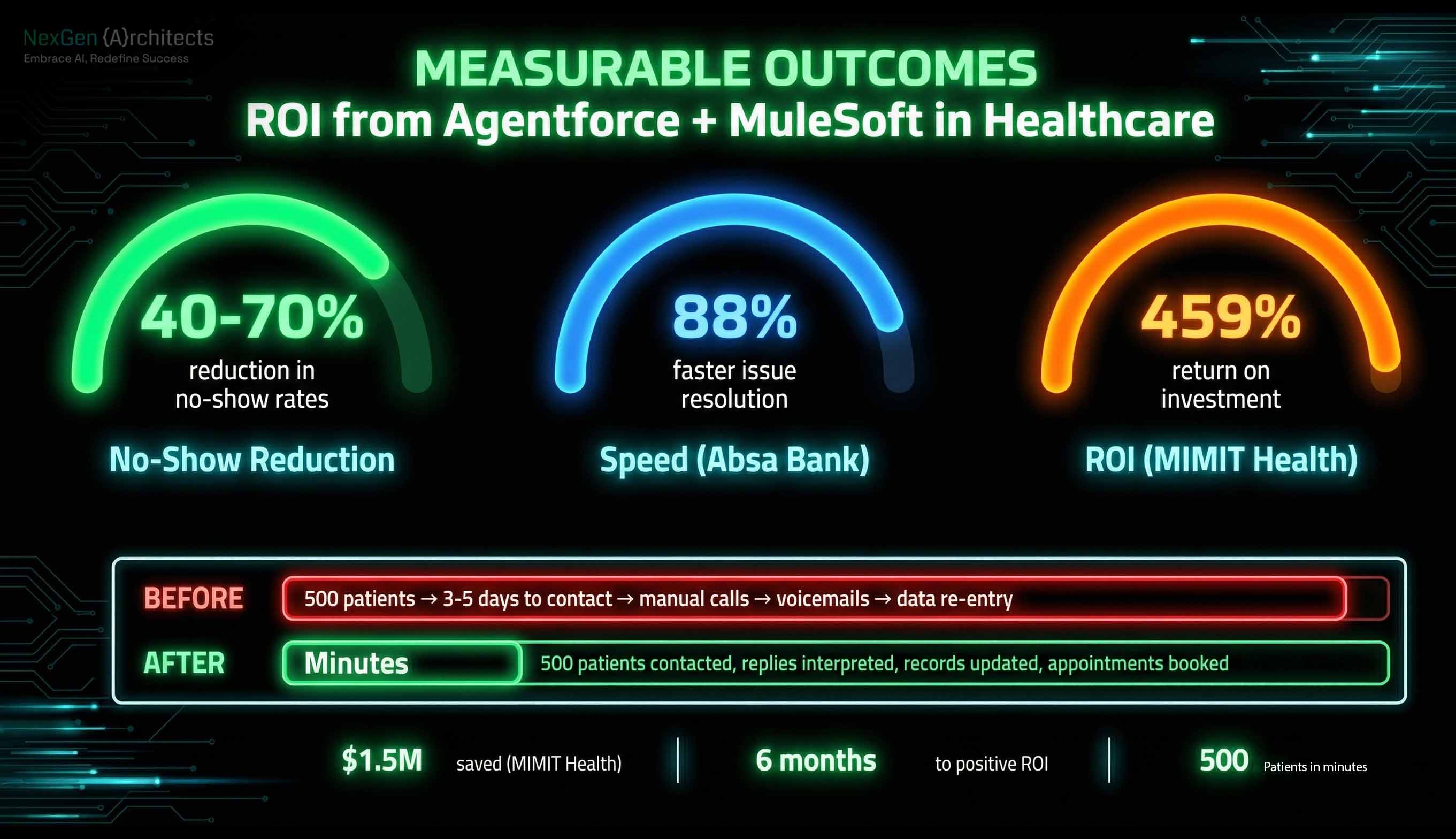
The return on investment comes from two distinct sources: recovering lost appointment revenue and reducing administrative staffing costs. Healthcare providers typically see a positive financial return within six months of completing their Salesforce implementation and MuleSoft integration.
Automated follow-ups reduce no-show rates by maintaining consistent, intelligent contact with patients. When a patient misses a cardiology check-up, the agent immediately initiates a rescheduling sequence. It references the patient's preferred communication channel and language. A new appointment is secured before the patient disengages from the health system entirely.
Early adopters have reported significant results. MIMIT Health achieved a 459% ROI by deploying Agentforce automation, saving $1.5 million through reduced administrative burden alone.
Clinical staff reclaim hours of focused time previously spent on manual outreach. They redirect energy toward complex cases requiring human empathy and clinical judgement. The financial impact appears in reduced overtime pay for administrative staff and maximised provider utilisation through full appointment calendars.
Key metrics to track

Effective deployment demands a specific technical foundation. This is where healthcare system integration expertise matters most. Platform teams must map clinical data flows precisely before activating any autonomous agents.
Ingest and harmonise data from your electronic health record system whether Epic, Cerner, or another platform. Data Cloud creates a unified patient profile that serves as the grounding context for AI agents. This is the same data unification challenge that underpins any successful digital transformation in healthcare: if your data isn't unified, nothing downstream works.
This is the critical integration layer. Configure API connections between your EHR and Data Cloud using MuleSoft's Anypoint Platform. Map FHIR (Fast Healthcare Interoperability Resources) data objects to Salesforce Health Cloud standard objects. This ensures clinical data flows in real time, not in overnight batches.
MuleSoft's API-led connectivity approach organises this integration into three layers:
This layered architecture means each integration is reusable. When you add a new system a pharmacy platform, a lab results feed, a billing connector — you don't rebuild from scratch. You compose new capabilities from existing APIs. That's what makes MuleSoft integration a long-term investment, not a one-time project cost.
Use Agentforce Studio to define specific topics and actions. A topic might be "Post-Surgical Follow-Up." The actions include checking symptom severity, scheduling appointments, and escalating high-risk responses to a human triage nurse.
Escalation design is critical. If a patient replies to a routine check-in with "my incision is bleeding," the agent must instantly route that session to a live clinical team member using Salesforce Omni-Channel routing rules.
Define strict guardrails in the Einstein Trust Layer to prevent agents from offering medical advice. The Trust Layer masks protected health information — names, dates of birth, medical record numbers — before it reaches the AI model. The model generates a response based on masked data. The system unmasks before delivering the message to the patient.
Build Flow automations that execute actual database updates when an agent completes a task. Every scheduled appointment, logged reading, or escalation must write back to Health Cloud in real time. Agents that chat without taking action inside your Salesforce platform provide no operational value.
Test agent responses against historical patient interaction logs to verify accuracy, tone, and clinical appropriateness before going live. This validation step is part of any responsible AI implementation and should involve both your platform team and clinical leadership.
Healthcare agents require highly specific instructions to function safely. Prompt engineering in a clinical setting differs significantly from standard customer service configurations.
The system prompt must explicitly state that the agent is an administrative assistant. It must never diagnose, prescribe, or recommend. Platform architects should collaborate directly with nursing directors to define the exact language the AI uses.
Consider a diabetic follow-up workflow:
Agentforce Studio's visual builder allows integration leads to map these conversation trees without writing code. Each node in the tree is assigned a specific Salesforce Flow, ensuring the agent takes tangible action inside your database at every step.
Deploying autonomous agents introduces specific data governance requirements. Every automated interaction must comply with HIPAA regulations. Protected health information cannot be fed into public large language models.
The Trust Layer removes sensitive identifiers from the prompt before it reaches the AI model. The model generates conversational responses without accessing raw patient data. The system reinserts identifiers only when delivering the final message to the patient through a secured channel.
Every action taken by an Agentforce agent requires a permanent record: the exact timestamp, the prompt used, the logic path followed, and the outcome. Compliance officers rely on these logs during regulatory audits. This audit capability is built into the Salesforce platform and doesn't require a separate compliance tool.
Start with low-risk workflows like annual wellness visit reminders. Monitor agent performance for 30 days. Review audit logs weekly to verify the AI adheres to predefined guardrails. Once the system proves reliable, expand to complex chronic care management protocols post-surgical follow-ups, medication adherence for high-risk populations, and readmission prevention outreach.
Automating patient follow-ups eliminates scheduling gaps, reduces administrative burnout, and drives measurable financial returns. The organisations seeing the fastest ROI follow a consistent pattern: unify patient data first, start with one low-risk workflow, prove the model, then scale.
The technical foundation matters. Agentforce is only as effective as the data it can access and the integrations that feed it. Getting the MuleSoft integration layer right, structuring your Salesforce Health Cloud data model correctly, and configuring Data Cloud for real-time patient profiles that's where implementation quality determines whether you see ROI in six months or spend twelve months troubleshooting.
.svg)

